

In today's hybrid working world, a cluttered desk isn't just unsightly — it's a productivity killer. Tangled cables snake across your workspace, gather dust, create trip hazards, and constantly remind you of unfinished tasks. Whether you're battling a forest of charging leads, monitor cables, and power strips in a compact home office or managing a multi-monitor setup in a professional environment, poor cable organisation wastes time and saps focus.
The good news? A handful of thoughtfully chosen cable management tools can completely transform your desk in under an hour. This buyer's guide — written for UK readers — walks you through everything you need to know. We'll cover why cable management matters, the essential tools available, how to choose the right ones for your setup, and our top recommendations based on real-world performance, durability, and value. By the end, you'll have a clear roadmap to a clean, professional, and stress-free desk.

Why Cable Management Matters More Than Ever
Modern desks host more devices than ever: dual monitors, laptops, phones, tablets, lamps, speakers, webcams, and wireless chargers. Each adds another cable. Without proper management, cables tangle, collect dust, overheat power strips, and make simple tasks (like moving your desk or vacuuming) a nightmare.
Beyond aesthetics, good cable management delivers tangible benefits:
- Improved safety — Reduced trip hazards and fire risks from overloaded or damaged cables.
- Better ergonomics — Cables stay off the floor and out of sight, allowing freer movement (especially important with height-adjustable standing desks).
- Enhanced focus — A tidy desk reduces visual clutter, helping you stay in flow state.
- Longevity of equipment — Organised cables suffer less wear and tear from constant pulling or bending.
- Professional appearance — Crucial for video calls or client-facing home offices.
UK studies and workplace ergonomics guidelines (including those from the Health and Safety Executive) consistently highlight that organised workspaces reduce stress and boost output. Investing in the right tools pays for itself quickly through saved time and frustration.
Before-and-after transformation is dramatic. One cluttered setup can become a minimalist haven with the right combination of clips, trays, and concealers.
Understanding the Basics of Desk Cable Management
Effective cable management follows three zones:
- Desktop zone — Short runs for daily-use items (mouse, keyboard, phone charger).
- Desk-edge zone — Cables that plug and unplug regularly (laptop charger, headphones).
- Under-desk zone — The heavy lifting: power strips, surplus cable length, and permanent connections.
Tools fall into two broad categories: temporary/reusable (Velcro ties, clips) and permanent/fixed (trays, grommets, sleeves). The best setups combine both for flexibility.
Budget-wise, you can start for under £20 with basic ties and clips, or invest £100+ for a complete professional system with metal trays and premium boxes. The key is matching tools to your desk type (fixed, sit-stand, glass, wood) and cable volume.
Essential Cable Management Tools Explained
1. Reusable Velcro Cable Ties and Straps
These fabric hook-and-loop straps are the unsung heroes of cable management. Unlike traditional zip ties, they are adjustable, reusable, and don't damage cables.
Pros: Quick to apply/remove, colour-coded options for easy identification, no sharp edges. Cons: Can look untidy if overused without bundling neatly. Best for: Bundling monitor cables, charging leads, or headphone wires on the desktop.
A good set includes 15–20 cm and 30 cm lengths in multiple colours. Wrap once around the bundle, then secure — instant order. Many users report they last years with daily use.

2. Adhesive Cable Clips and Holders
Small plastic or silicone clips with strong 3M-style adhesive backing that stick to the underside or edge of your desk.
Pros: Invisible when installed correctly, hold multiple cables, cheap and effective. Cons: Adhesive can fail on textured or dusty surfaces (clean first with alcohol). Some require no-drill mounting. Best for: Routing cables along desk legs or under the surface to keep them off the floor.
Magnetic versions are excellent for metal desks or standing desks where you need repositioning flexibility.

3. Under-Desk Cable Trays and Raceways
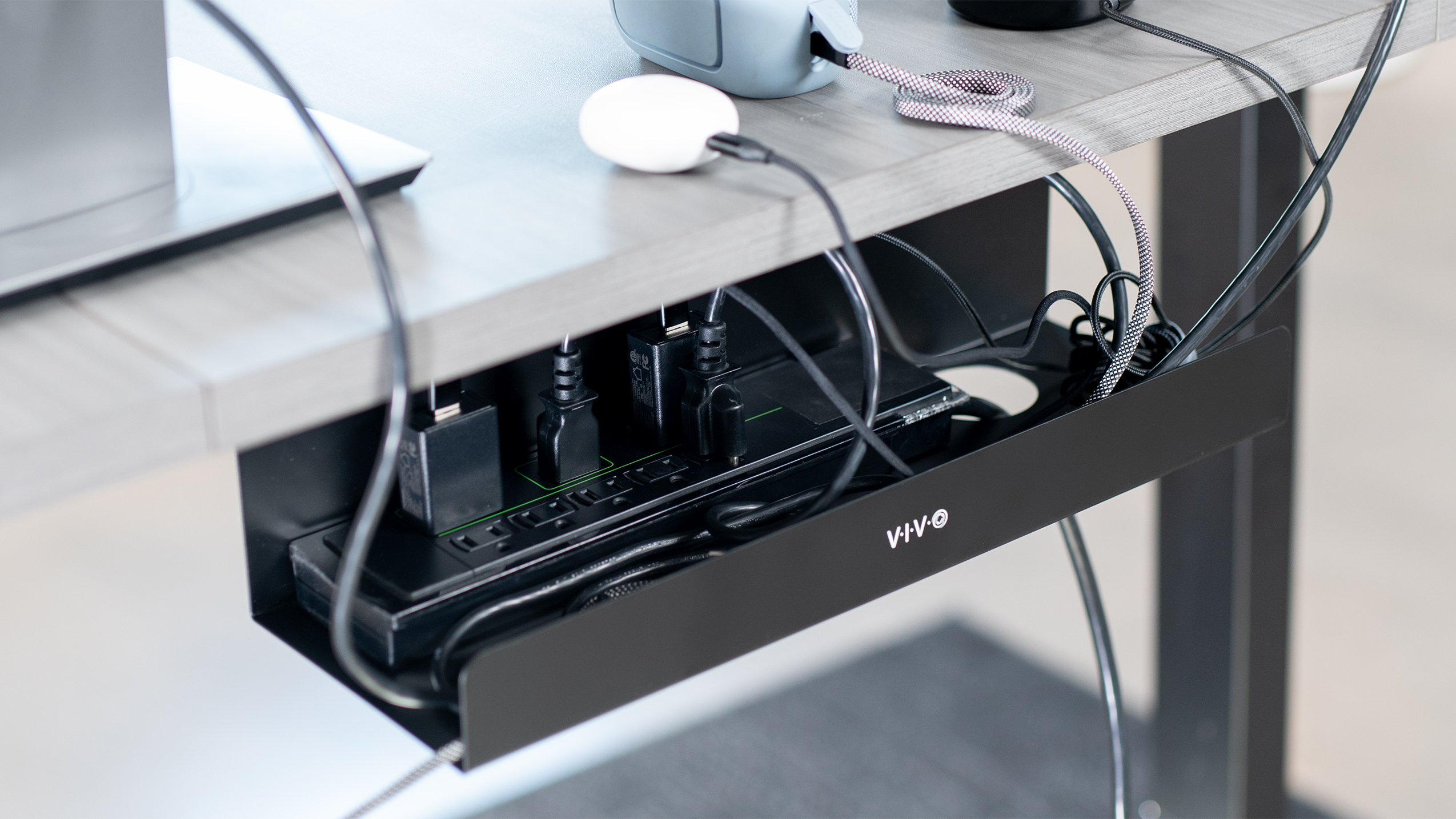
These are the game-changers for larger setups. Metal or plastic trays screw or clip under your desk and hold power strips plus bundled cables.
Pros: Massive capacity, keeps everything elevated and accessible, works brilliantly with standing desks (cables move with the desk). Cons: Requires installation (drilling or strong adhesive), adds slight height. Best for: Home offices with multiple devices or sit-stand desks.
Popular UK options include powder-coated metal trays that blend with modern desks. Look for adjustable widths and ventilation slots to prevent overheating.
4. Desk Grommets and Cable Pass-Throughs
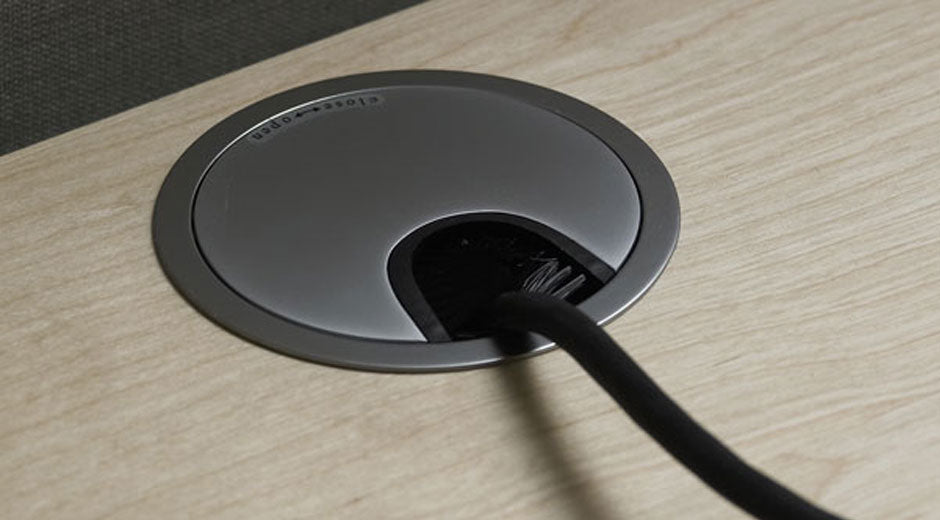
Circular or rectangular holes fitted into your desktop that allow cables to drop neatly through to the underside.
Pros: Completely hides cables from view on the desktop, professional finish, works on any desk material (with correct sizing). Cons: Requires cutting a hole (or buying a desk with pre-drilled options). Flexible brush or rubber versions prevent dust entry. Best for: Permanent monitor and power cables on wooden or laminate desks.
5. Flexible Cable Sleeves and Conduits
Split loom tubing or spiral wrap that encases multiple cables in a protective sleeve.
Pros: Protects cables from wear, hides unsightly colours, easy to add/remove cables later. Cons: Can feel bulky if overfilled; spiral types are more flexible but less neat. Best for: Long runs behind desks or along walls.

6. Cable Management Boxes and Concealers
Lidded boxes (often wood-effect or fabric) that hide power strips and excess cable length on the floor or under the desk.
Pros: Instant neatness, doubles as a decorative item, child/pet-safe. Cons: Limited capacity; larger boxes take up floor space. Best for: Living rooms or offices where the power strip must stay accessible but hidden.

How to Choose the Right Tools for Your Desk
Consider these key factors:
- Desk type: Sit-stand desks need flexible solutions like cable spines or trays that move. Glass desks suit adhesive clips that won't mark the surface.
- Cable volume and type: Thin charging cables need smaller clips; thick power leads require robust trays.
- Aesthetics: Match colours (black, white, wood-effect) to your desk. Transparent clips disappear completely.
- Budget: Starter kit (£15–30), mid-range (£50–80), premium (£100+ for metal systems).
- Installation skill: No-drill options for renters; screw-in for permanent setups.
- Future-proofing: Choose modular systems that expand easily.
Measure your desk underside clearance and cable lengths first. Standing desk users should prioritise tools that flex vertically — cable spines or hanging trays are ideal.
Safety tip: Never overfill trays or boxes — allow airflow to prevent overheating. Use surge-protected strips and check cables annually for damage.
Top Recommendations for UK Buyers (2026)
Here are standout products that consistently appear in expert tests and user reviews:
- Reusable Velcro Ties (e.g., OneLeaf or generic 60-piece packs) Around £8–12. Colour-coded, perfect starter purchase. Bundle everything in minutes.
- Adhesive Cable Clips (40–120 piece packs with 3M tape) £6–15. Excellent for desk edges. Transparent versions vanish on light wood.
- VIVO or Ergo Desks Under-Desk Cable Tray £25–45. Metal construction, easy clip-on or screw fix. Holds full power strips plus 10+ cables. Highly rated for standing desks.
- D-Line Cable Management Box (Large size) £18–25. Classic UK favourite — hides extension leads completely while looking like modern decor.
- Flexible Desk Grommets (2-inch brush style) £10–15 for a pair. AACGIN or similar brands offer flexible rubber options that open/close easily.
- Split Wire Loom or Spiral Cable Sleeve £10–20 for 5–10 metres. Ideal for long runs; black blends with most setups.
- Premium option: Humanscale NeatTech or CMD Ltd metal baskets £80–150. Investment-grade for large offices — lifetime durability and sleek design.
Complete kits (clips + ties + small tray) from brands like TeegRoow or Amazon basics start at £20 and cover most needs.
Pro tip: Start with a £30 starter kit (clips + Velcro + small box), install it, then add trays or grommets if needed. Most users see 80% improvement from the first three tools alone.
Installation Tips and Common Mistakes to Avoid
- Clean surfaces thoroughly before applying adhesive.
- Bundle cables loosely — tight wraps cause strain.
- Label important cables with small tags.
- Route power cables separately from data cables to reduce interference.
- For standing desks, use a vertical cable spine to prevent pulling during height changes.
Avoid cheap no-name zip ties — they snap and damage cables. Never use duct tape; it leaves residue and fails quickly.
Conclusion: Transform Your Desk Today
A tidy desk isn't about perfection — it's about systems that make organisation effortless. With the tools in this guide, you can eliminate cable chaos permanently and create a workspace that looks professional, feels calming, and actually helps you get more done.
Start small: clear your desk, sort cables by length and purpose, then apply Velcro ties and clips. Within 30 minutes you'll wonder how you ever worked in the mess. Whether your budget is £20 or £200, the right combination of trays, clips, sleeves, and boxes will deliver results that last for years.
0 comments